Guide · Editing
Are estate agents allowed to edit property photos? What UK rules allow, and what they do not
Yes: an estate agent may edit listing photos, including with AI, as long as the photo does not mislead a buyer about the property. Brightening a room is ordinary practice, a virtually furnished room must say so, and hiding a structural problem is never acceptable. Here is where the line sits for each kind of edit, the five things never to do, and the wording that keeps a listing on the right side of it. This is general guidance, not legal advice.
By Teddy Verneuil, founder of Maiso · Updated

The rule: a photo must not give a false impression of the property
Nothing in UK law bans editing a listing photo. What it bans is a misleading listing. Consumer protection law, which since April 2025 sits in the Digital Markets, Competition and Consumers Act 2024, treats a commercial practice as unfair when it gives a false impression of a product, or leaves out something a buyer needs to know. A photograph is part of that. Trading Standards enforces it, and the advertising rules of the ASA apply to listings as well.
So the useful question is never “was this photo edited?”. Almost all of them are. It is this one:
Would a buyer who walks in feel the photo lied to them about something that matters to their decision?
A brighter room does not fail that test. A bedroom shown with a window that is not there does. Everything below is that test applied to the edits agents actually make.
Three kinds of edit, three different rules
Not every edit carries the same risk. We sort them into three levels, by what the photo still says about the property.
| Level | Examples | Label needed? | Risk |
|---|---|---|---|
| Correction | Brighter light, straight verticals, colour balance, a blurred number plate | No | Low: the property has not changed |
| Enhancement | A blue sky on a grey day, a greener lawn, clutter removed (bins, cables, a pile of post) | Good practice | Medium: only if it hides something permanent |
| Simulation | A furnished room, an emptied room, repainted walls, a dusk shot | Yes, always | High if unlabelled: the room does not look like this |
The test is permanence. Something that will not be there on the day of the viewing (a bin, a car, today’s weather) may be removed. Something that will be there (a pylon, a crack, a neighbouring building) may not.


Why simulations need their own rule
A virtually furnished room is the one edit where the picture shows something that is not there. That is acceptable, and widely used, because it helps buyers picture the space. It stops being acceptable the moment a buyer cannot tell it is a simulation. Hence the label, and hence the original photo next to it.
Five things never to do, even with perfect software
Most complaints about edited photos are about one of these five.
- Hiding a structural or condition problem: damp, cracks, a leaking roof, subsidence. If a buyer would care, it must stay visible.
- Removing something permanent from the surroundings: a pylon, a motorway, a neighbouring block, a nearby railway line. Cropping a view is fine; erasing it is not.
- Adding what the property does not have: a garden, a sea view, a window, a conservatory, more floor space.
- Distorting the space: an extreme wide-angle that makes a small room look twice its size is a misleading edit, even if no software was involved.
- Presenting a simulation as real: a staged or emptied room with no label, or a label buried where nobody reads it.
The temptation is real, because these edits work: they make the photo better and the viewing worse. A buyer who arrives to a different house reads every other photo in the listing with suspicion, and the agent pays for that.


How to label a virtually staged photo so nobody is misled
There is no single mandatory wording, but there is a clear practice that works: say it plainly, say it on the photo, and keep the original available.
| Do | Avoid |
|---|---|
| “Virtually staged” in the photo caption and in the listing description, where the portal shows it with the photo | A disclaimer only on the last page of the brochure |
| The same words on the image itself wherever the portal allows text, and on every other use: your website, a brochure, social media | “Images for illustration only” as the only protection |
| Keep the original, unstaged photo in the listing | Showing only the staged version of a room |
| Describe what is simulated: “furniture added”, “room emptied” | A vague “digitally enhanced” on a photo that was furnished from scratch |
Check the portal’s own rules before stamping text on a picture. Rightmove’s technical guidelines, in their January 2026 edition, say images must not contain text, and they allow AI, CGI and manually edited content (“Enhanced Edits”) provided it does not misrepresent the property, is accompanied by current, accurate images of the room and is clearly labelled as AI or otherwise enhanced. Zoopla’s members’ terms require the member to make it clear when a photo was produced with AI or similar technology. Neither portal says where the label must sit, and read literally Rightmove’s rules leave the caption and the description. We cover the portal rules in our guide to Rightmove and Zoopla photo requirements.
A small print line such as “photos not contractual” does not, on its own, cure a misleading picture. What protects a listing is that a reasonable buyer was not misled in the first place.
Editing with the safeguards built in
Most of the risk above comes from tools that return one finished image and leave the rest to you. A tool built for agents can do some of the policing, which is how we designed Maiso.
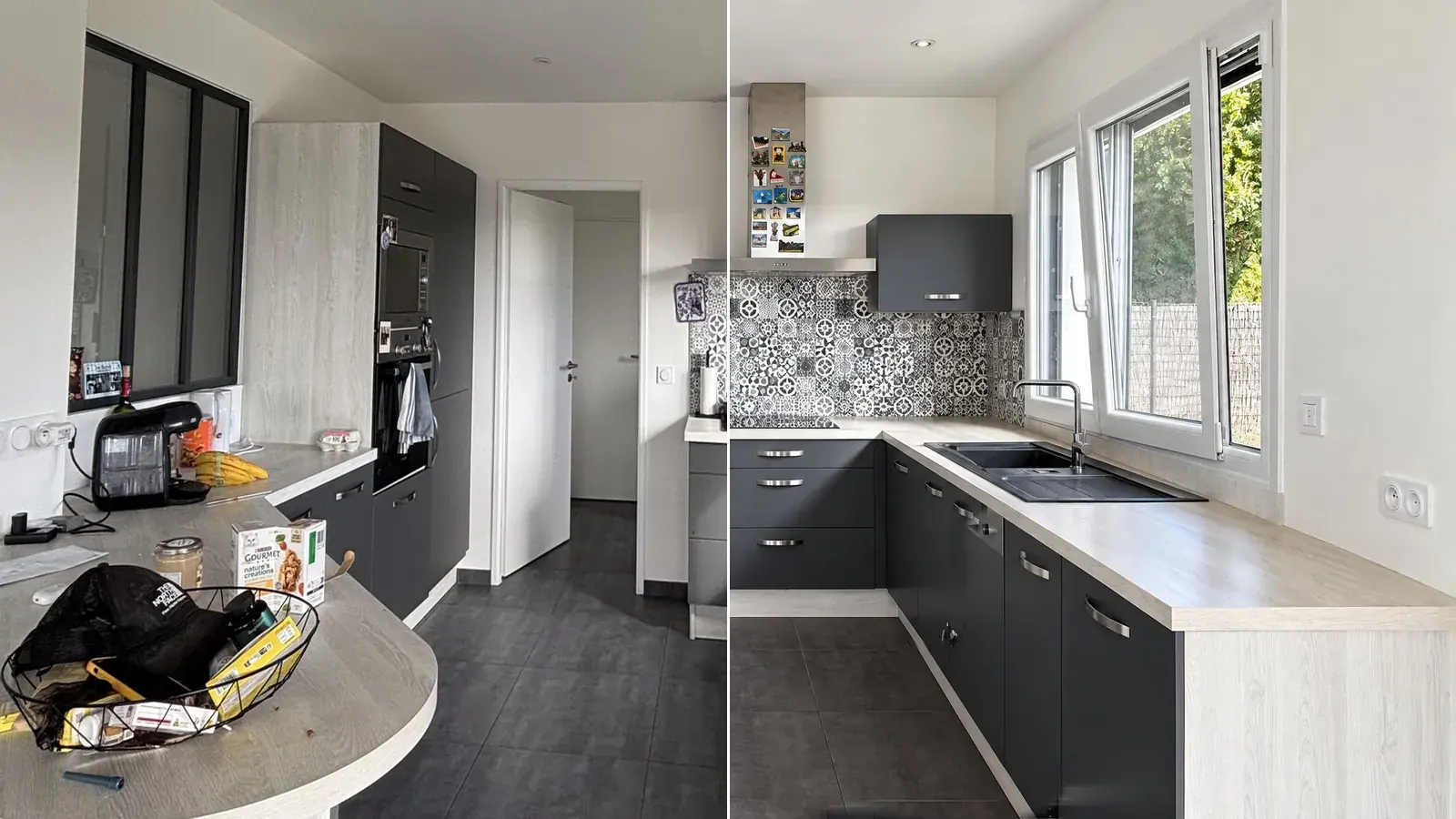
The result always arrives next to the original, and the original is never overwritten. Every tool belongs to one of the three levels above, and the page where you pick it says which. A simulation, such as furnishing or emptying a room, is flagged in the studio with a badge and in the history, so you know which photos need a caption. You can also export with your own logo on the image, as an option. An automatic check flags a result that has drifted too far from the original, and a result you reject returns your credit. See what each tool does on real photographs on our page about AI photo editing for estate agents, and how it compares with the rest in our comparison of estate agent photo editing software.
None of this replaces your judgement about your own listing. It makes the careful option the default one.
Try it free10 free credits, no card needed.
If you are the vendor, not the agent
You can edit the photos of your own home too, and the same test applies: a buyer must not be misled about something that matters. If an agent is marketing your property, ask what they edit and whether simulations are labelled. The listing is theirs to answer for, but it describes your home.
And if you are comparing what a professional shoot would cost against editing your own photos, our guide to what a property photographer costs puts the numbers side by side.
Frequently asked questions
Are real estate agents allowed to edit photos?
Yes. Editing for light, colour and straight verticals is ordinary practice. The limit is that the photo must not mislead a buyer about the property, so edits that hide a defect, remove something permanent or add something that is not there are not acceptable.
Can estate agents use AI to edit listing photos?
Yes, with the same limit. AI changes how fast an edit is made, not the rule. A listing that was misleading with a manual edit is just as misleading with an AI one, and AI makes large, convincing changes easier, so the discipline of labelling simulations matters more.
Do you have to say a property photo is virtually staged?
In practice, yes. Virtual staging is acceptable when buyers can tell it is a simulation. The safest practice is a clear “Virtually staged” in the photo caption and the description, a current photo of the room in the listing, and the same words on the image itself wherever the portal allows text. Rightmove’s guidelines say images must not contain text.
Can you replace a grey sky with a blue one?
Generally yes: the weather on the day is not a feature of the property. Keep it believable, and do not use a sky edit to hide something on the skyline that will be there at the viewing.
Can you remove bins, cars or clutter from a photo?
Yes, for things that will not be there at the viewing. Removing a permanent feature, such as a pylon, a crack or a neighbouring building, is the kind of edit that causes complaints.
What happens if a listing photo misleads buyers?
Trading Standards or the advertising regulator can take enforcement action, which can include fines. Before that, the practical cost is a failed viewing and a buyer who stops trusting the rest of the listing.
Edit your next listing’s photos with the original beside them.
Ten free credits, no card needed: enough to edit the photos of a whole property and see exactly what changed.